Tell your briefing where you're heading tomorrow
Set tomorrow's destination when you log tonight's stop, and the morning briefing plans toward it — distance, marinas and anchorages along the way, weather at your destination, a heads-up if it looks like you're heading the wrong way.
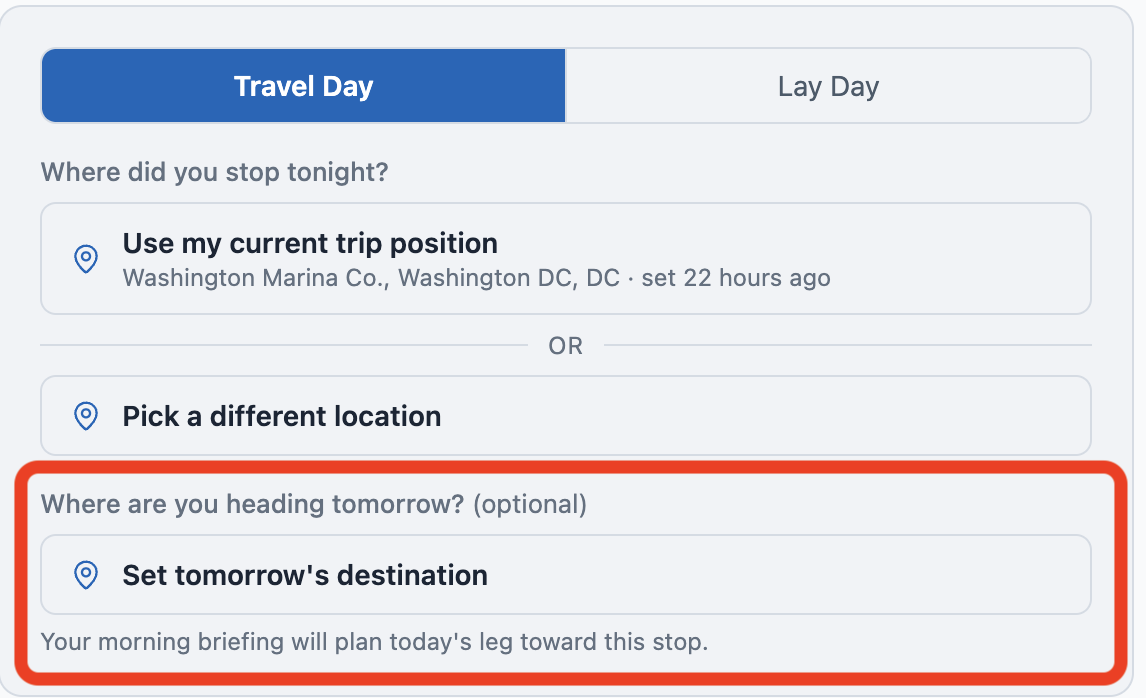
Set tomorrow's destination from your daily log
On the daily log form (Log Today or Edit Today), below where you log tonight's stop, there's a new section: "Where are you heading tomorrow? (optional)". Tap "Set tomorrow's destination", search by marina or anchorage name, or switch to the Map tab and tap your spot. Save the log.
The next morning's briefing reads your destination and plans the day toward it — leg distance, stops along the way, weather at the destination, locks and bridges you'll pass. Before this, the briefing guessed where you'd end up based on the canonical route; now it knows.
Today's Route table starts where you're starting
The "Today's Route" table at the bottom of the briefing now opens with your starting location, marked 📍 Start of today's leg. Stops are listed in the order you'll pass them, ending with 🏁 your destination if you set one. No more confusing rows at "0.0 NM" — the table now matches what your day actually looks like.
Heads-up if your destination is behind you
Pick a destination that's behind your direction of travel — say you're heading north up the ICW and you tap a marina back south — and the picker warns you: "This appears to be behind you. Save anyway?" Sometimes that's intentional (you're going back to pick something up). The warning is non-blocking; you can save anyway.
Generate Now does the right thing
If you've already logged today's stop and tap "Generate Now" on My Trip, you get tomorrow's briefing — the one you haven't seen yet — instead of re-running today's. The preview line and modal header now show both dates: which day the briefing is for, and how long ago it was generated.
My Trip shows what's set
The Tonight card on My Trip gets a "→ Heading to X tomorrow" chip when you've set a destination. The "Today's briefing" card below echoes it — either "Tomorrow's destination: <name>" or "Tomorrow's destination is not set" with a prompt to set one if you want destination-aware planning.