See your whole Loop at a glance — and share it with anyone
The Trip Map Dashboard now lays out your entire Loop on one screen — every stop you've logged, today's leg, and the route still ahead. And from My Trip you can mint a public link that opens a clean, read-only version of that view for fellow Loopers, family, or anyone you want to follow along. No sign-in required on their end. You stay in control of what's visible and can rotate or revoke the link whenever you want.
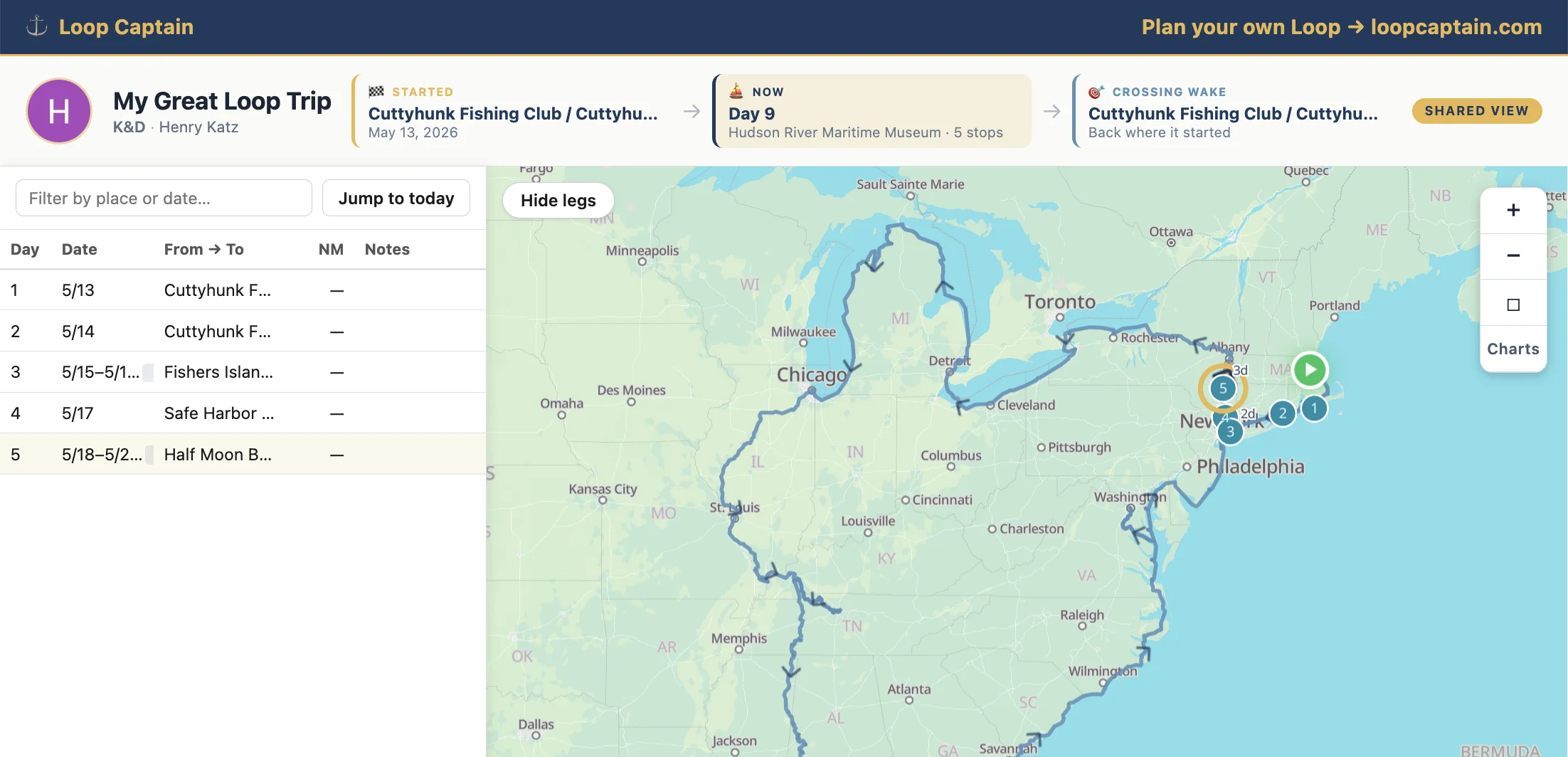
A public link to your dashboard
From My Trip, hit Create share link in the Share your trip card. You get a public `/dashboard/<token>` URL you can drop in a text, email, or AGLCA forum post. Anyone with the link opens a read-only view of your trip — no Loop Captain account needed.
It's a read-only mirror, not a live edit surface. Viewers see the map, the milestone band, and the day-by-day stop list, but there are no edit buttons, no log forms, and no buried trip settings — just your journey. You stay in control of what's actually written.
You choose what fellow Loopers see
Three visibility levels, switchable at any time from the same Share card:
- Everything — past stops, today's leg, and the planned future arc.
- Past + today — past stops and today's leg, but the future path is hidden (useful if you'd rather not telegraph the next several weeks of cruising plans).
- Past only — just the stops you've already logged.
Revoke or rotate when you're ready
Sharing isn't forever. From the same card you can Rotate the URL (old link stops working immediately, new one takes over) or Revoke it entirely. Both prompt you to confirm so you can't trigger them by accident.
What viewers actually see — the dashboard itself
The dashboard packs your whole Loop onto one screen with three visual layers, each telling a different part of your story:
- Past stops as numbered teal pearls, with a gold halo on your most recent one — eyes land on "where they are right now" instantly.
- Today's leg as a bold gold line with direction chevrons.
- The rest of the enabled Loop as a sky-blue line tracing the path still waiting.
Milestone band — Started, Now, Crossing Wake
Above the map, three cards anchor the story for anyone opening your link cold: where your Loop began, where you are right now (with day count and stop count), and the point where you'll cross your own wake to complete the Loop. Once your trip closes the wake, the third card lights up to mark the moment.
Day-by-day panel that talks to the map
Both you and your viewers get a side panel listing every stop in order — day number, date, from-to facilities, nautical miles (with a locks badge underneath when relevant), and notes — plus a quick filter and a Jump to today button. Click any row and the map pans to that pearl with a read-only details card; click any pearl on the map and the matching row scrolls into view. The URL bundles the selected day too, so you can deep-link friends to a specific stop on your trip.