See today's route on the map — everywhere you plan your day
Your daily log, your trip page, and the morning briefing now each show a small map of today's route — from where you started to where you're heading, with distance and a rough time estimate. Tap to expand to the full map; tap Edit on either pin to fix the underlying log entry.
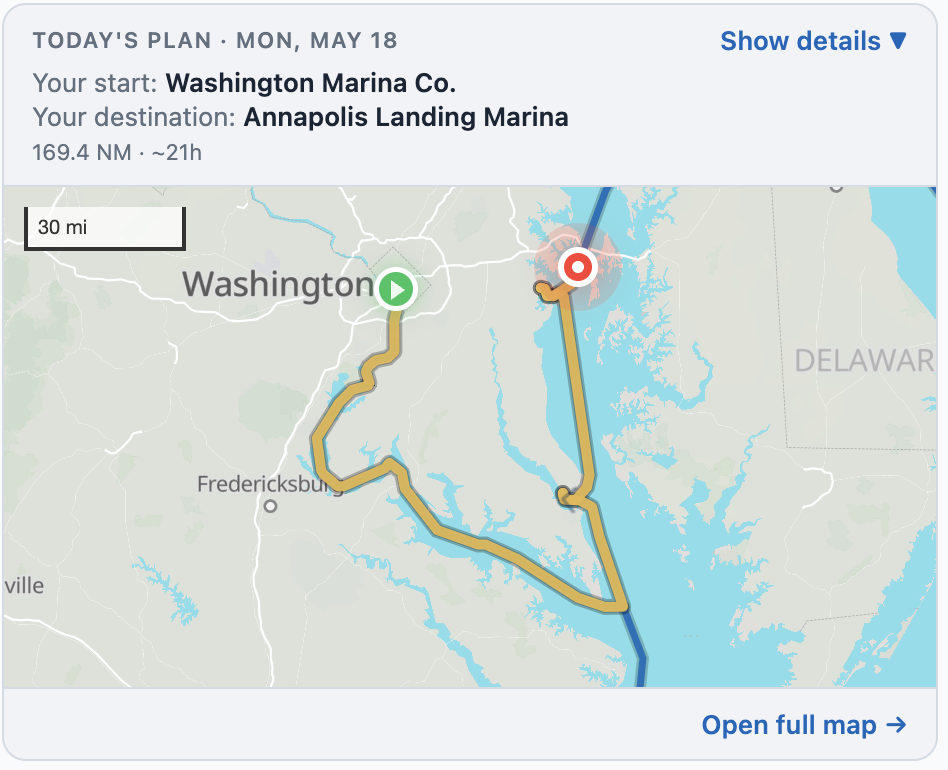
A mini-map on the surfaces you already use
Three places now show today's route inline:
- The daily log form (Log Today / Edit Today) — below the chip where you set tomorrow's destination, both on desktop and on mobile
- My Trip — under the day-counter on the v2 mobile page, and on the v1 desktop page too
- The morning briefing email — a "View today's route" button at the top that drops you straight onto the full map for that day
Tap to expand for the full picture
Tap any inline map and on mobile it opens as a fullscreen sheet; on desktop, "Open full map →" takes you to the dedicated route page. When you arrive there, a clear "← Back to log entry" / "Back to My Trip" button is waiting in the header so you don't lose your place.
Today's plan, labeled so you can tell what you're looking at
The inline map opens with a short header so there's no ambiguity:
- TODAY'S PLAN · MON, MAY 18 — so you always know which day it's framing
- Your start: the marina or anchorage where you tied up last night
- Your destination: where you're heading next (or a friendly nudge to set one)
- Distance, rough travel time, and bridge count on a single line
Show details — see who said what, and when
Tap "Show details ▼" and a card opens with the provenance: a small green pin next to your starting facility and a small red pin next to your destination, each with the "Logged via Log Today on Thu, May 14, 5:00 pm" stamp and an Edit link so you can jump straight to the entry that set it. No guessing how the route got built.
Pick a destination and the map shows it right away
Before today, after you picked tomorrow's destination from the picker, the map didn't update until you hit Save on the log form. That created a moment of "did it take?" Now the destination saves the moment you return from the picker — the embed shows the new route immediately, and the Save button is reserved for any free-form notes you've added.
Distant destinations render the whole way
There used to be a hard 150-mile ceiling on how far the route preview would draw — so if you committed to a 180-mile run (some Loopers do, especially in open water), the embed showed only the first 150 miles and the destination floated alone. Now, whenever a destination is set, the route draws all the way to it. The ceiling stays for the "where might you end up tomorrow?" prediction when you haven't committed yet, but it never crops a destination you've actually chosen.
Today's leg, before the trip officially starts
If your trip start date is still in the future and you peek at today's route, the embed now opens with a small caption — "Planning your first day from trip start anchor" — so you know the line you're looking at is your planned Day 1, not an actual logged leg. The caption disappears the morning your trip begins.