A shared trip page worth sending — and maps that explain themselves
The page your family and dock mates open got a full redesign, your trip maps gained a Map key, and the morning briefing stopped saying things that aren't true.
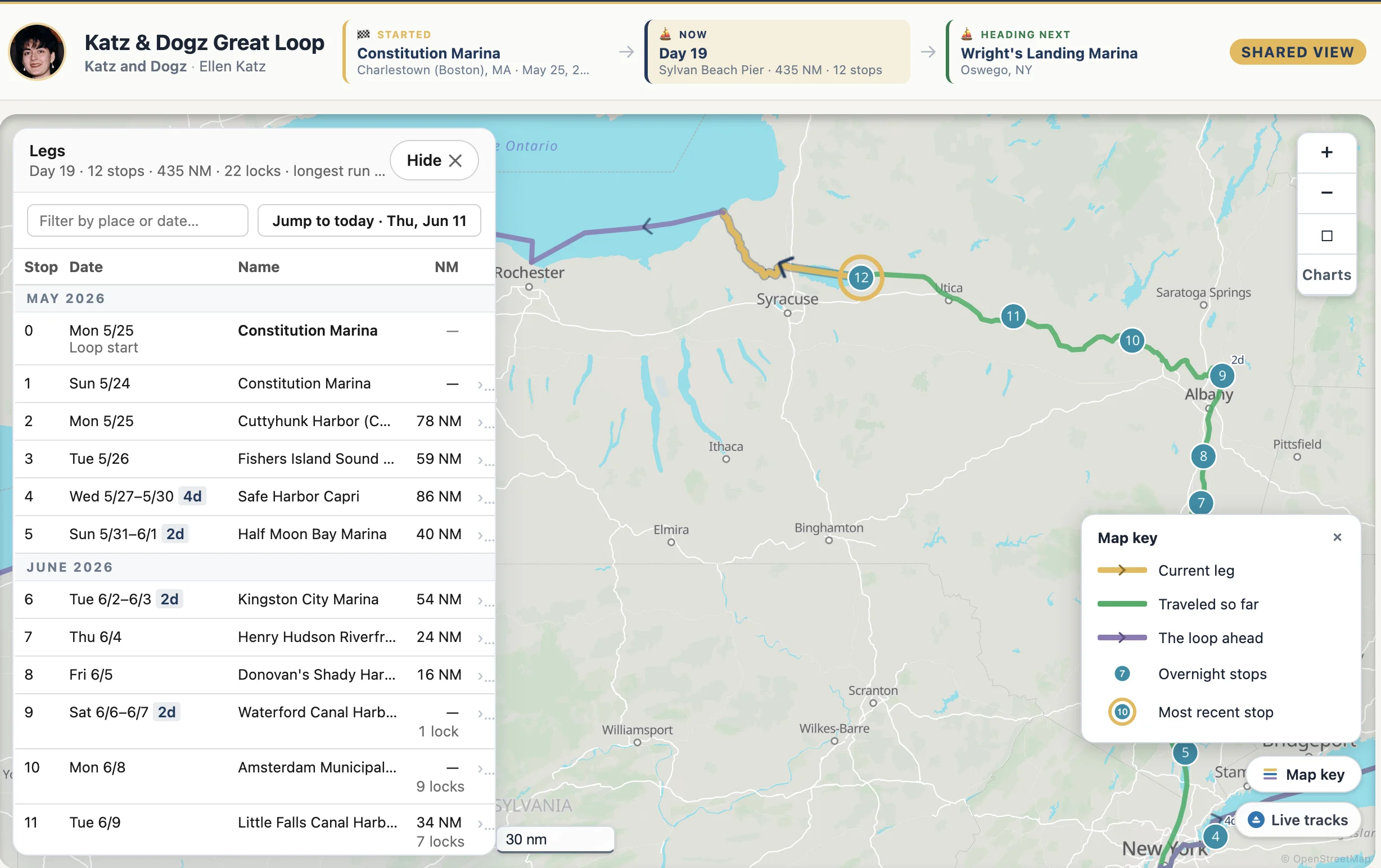
The shared Trip Map Timeline, redesigned
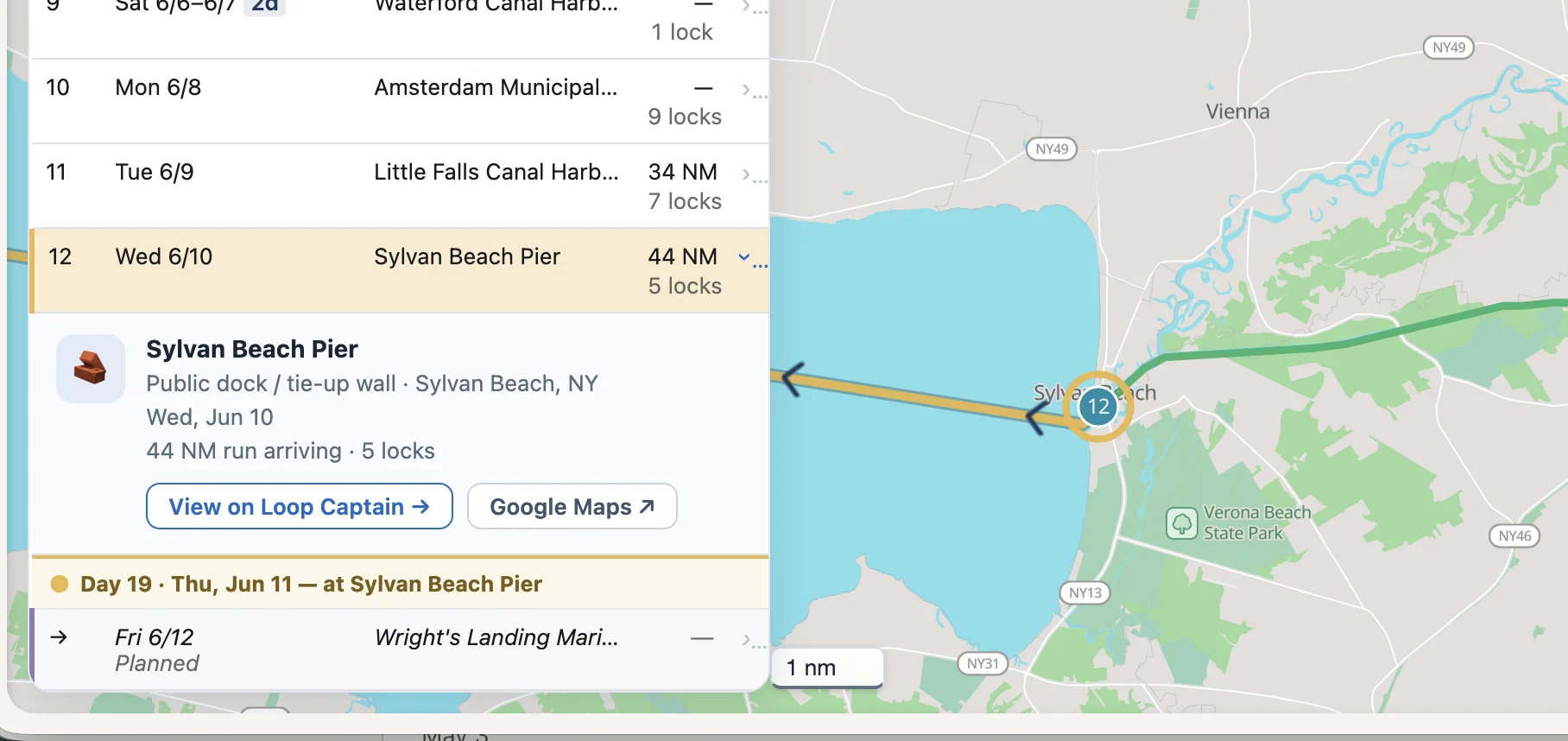
Share your trip and visitors now get:
- A milestone band: where you started, what day you're on — and, when you've shared one, where you're heading next.
- A stops table that opens with your Loop start as stop 0, weekday dates on every row, and month dividers as the trip grows.
- A gold marker line — "Day 32 · Thu, Jun 11 — at Sylvan Beach Pier" — showing exactly where you are in the list.
- Clickable rows: the map flies to the stop and a card opens with the facility's type, town, your stay dates, the miles run — plus links to the facility on Loop Captain and on Google Maps.
- The planned next stop as its own row, expandable like the rest.
- Trip stats in the header: day count, stops, total miles, longest run.
- A framed map with your traveled route in green — same color as your own view.
Every map explains itself
A "Map key" button now sits on the shared view, the Trip Map, and the Timeline. Tap it and every line and pin on that map is named, drawn in its actual style — today's leg, the water behind you, the route ahead, your stops.
- The route ahead changed from blue to purple — it can no longer be confused with the water you've traveled.
- The distance scale is now a readable chip on every map instead of a faint line.
Briefings that tell it straight
Several fixes to what the morning briefing says about bridges, locks, and itself:
- Fixed bridges never "open" — the briefing now says so, gives the published clearance, and notes that actual clearance varies with water level.
- Locks carry their real radio channels — channel 13 across the NYS canal system, with the exceptions noted.
- Canal operating hours print once, not repeated for every lock on the leg.
- The briefing card states exactly what it covers: "Sylvan Beach Pier → Wright's Landing Marina · generated Thu, Jun 11, 6:00 AM."
- Arrive somewhere and the card knows: it offers to regenerate for the next leg instead of presenting the finished one as current.
Logging, with fewer ways to go wrong
- Started your Loop before you found Loop Captain? Set your start, then backfill day by day — there's a How-To guide, and the first logged day now works on every trip.
- Logging a missed day suggests the right previous stop for that date, not wherever the boat is now.
- Lay days attach to the stop you picked, not the date's other arrival.
- Days entered out of order wire themselves correctly.
- When a save can't go through, you get the reason in plain English — "The arrival time must be after the departure time for that day's run" — not an error code.
Also in this release
- Trip Map Timeline and Photo Story share buttons now sit right on your Trip Log card.
- The Plan & briefing card leads with "Read briefing" when your briefing is ready and current.
- A new "Loop Captain How-Tos" section opens the Learn page — step-by-step guides to the app itself.
- No body text smaller than 13px on My Trip, the briefing, or the timelines.