The new Trip Timeline — and your wake, painted green
Your trip log now reads like a captain's table: every stop on one line — when you arrived, when you left, how far you ran — with any day one tap from fixing. And on every map, the water you've already crossed is painted green, right up to today's arrival.
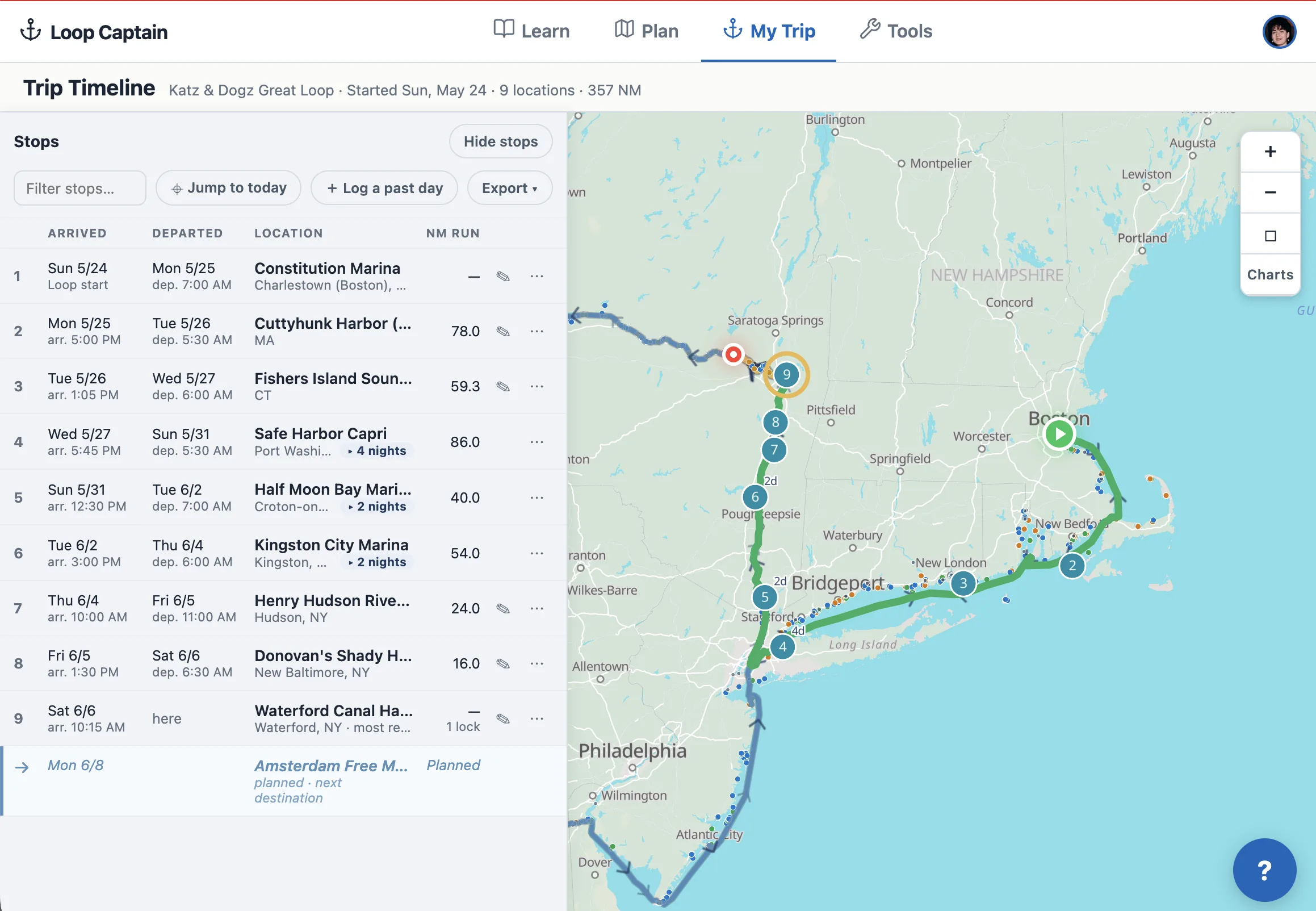
A Timeline built around your stops
Open Timeline from your Trip Log card and you get a clean table of the journey so far: one row per stop, numbered in order, with Arrived and Departed dates (each leading with the weekday — "Thu 6/4"), times when you logged them, and the miles you ran to get there. Stay somewhere a few nights? The row says "2 nights" and expands to show each day — travel days, lay days, today marked (Today).
Anchored on a spot without a name? It now reads like a place: coordinates plus the nearest town — "43.229°N, 76.299°W · Phoenix, NY."
Click any row and the map glides to that stop, marking it with a pulsing blue ring — blue is always your selection, gold is always your most recent stop, so the two can never be confused.
Fix any day, fill any gap
Every row has a menu: edit the day, add a lay day, add a stop on a date, or delete a day. Skipped a week of logging? The Timeline shows the gap — "5 unlogged days" — with an Add button right there, and a "Log a past day" button up top for anything else. Exports (print, spreadsheet, email) moved here too, so the record of your trip and the tools to polish it live on the same page.
The water behind you is green now
On the Timeline map and the My Trip mini map, your completed route draws in green — distinct from the gold of today's leg and the blue of the route ahead. The moment you log tonight's arrival, the day's run turns green with it. That green line is your wake.
Maps and forms that say what they mean
The My Trip mini map now always explains itself in a caption below the map: "Showing the leg for Sat, Jun 6 (Today)" before you arrive, and once today's arrival is logged, "Showing your NEXT leg" — with the reason. No more guessing what the line on the map represents.
The log's time fields got the same honesty: instead of bare "Departed" and "Arrived" labels, they name the places — "Departed · Kingston City Marina" and "Arrived · Henry Hudson Riverfront Park" — so it's clear the departure belongs to the stop you left, not the one you reached.
Saves you can trust — thank you, Ellen
Two bugs found by Ellen aboard Katz & Dogz are fixed. Editing a travel day's location used to report success while quietly keeping the old spot — location edits now save everywhere. And when any part of an edit can't be saved, the app now says exactly what failed instead of showing "Entry updated" regardless.